

about assistant
MORE THAN
1 300 000
USERS
MORE THAN
2 000 000
DEVICES
MORE THAN
1 000
CUSTOMERS
Scalability
The architecture of Assistant easily and quickly scales according to the needs of customers, which ensures the availability and reliability of the system under high load conditions.
The Assistant provides a secure and reliable connection for hundreds of thousands of users at the same time.
Scalable infrastructure based on:
- more than two dozen Tier III data centers in Europe and Asia
- high degree of server infrastructure redundancy
- automatic switching to a backup data center in case of an accident or loss of communication
- automatic recovery of server infrastructure
Automatic Rollout
System administrators with security authority can automatically install and update the Assistant on all your corporate computers, servers and mobile devices.
- Remote installation and configuration
- Silent installation option
- Efficient installation and update on thousands of computers, phones and tablets at the same time.
Security features
We take the safety of our customers seriously. That's why the security features we've developed are some of the best:
- 256-bit AES Encryption
- Two-Factor Authentication
- Access right and policies management
- Integrity controle
- User Whitelisting and Blacklisting
- Logging user actions
- TLS 1.3, HTTPS, SSL protocols
- ISO/IEC 15408 Certified and Compliant
- ISO 27001 Certification for Information Security Management

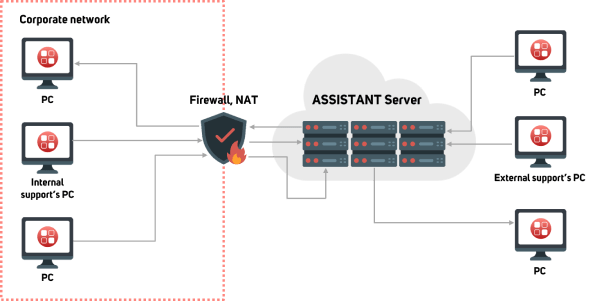
ASSISTANT IN CLOUD
Secure remote access via the Internet, using a cloud service:
- Suits every business size
- Small team in the technical support department
- No need to buy server hardware
- Easy to install and use
- Independent global server infrastructure
- Customized Clients available
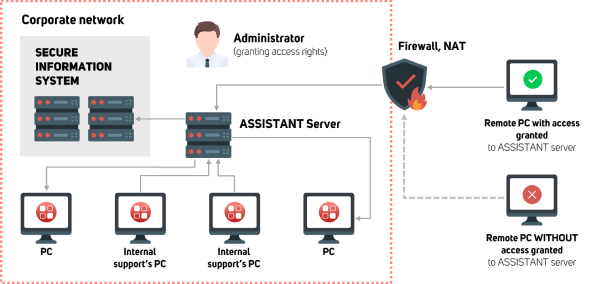
Assistant on-premises
Remote work within a secure local network of the company:
- Suits big businesses with individual security policy
- Customizable solution
- Self-hosted and self-managed by your IT team
- Data remains within your company network
- Installed on the company's server equipment
ways to use

Remote work from home or on a business trip

Access to documents and data stored on remote computers

Implementation tool for technologies in your organization

Access to corporate information systems or databases

Technical support in the use and setup of PC equipment, hardware and software

Helpdesk support within the corporate network, including geographically distributed organizations

Application sharing on multiple users

Training in the use of computer hardware and software

Allow the organization's employees to use the company's resources remotely

Working with high-demanding applications installed on remote mainframes

Technical support with built-in HelpDesk for the organization's own needs or external parties

Providing controlled access to third parties to internal company resources for occasional and periodic work